USB & SD formatter for Android
Format USB & SD drives from your phone
A USB formatter for Android that needs no computer and no root: plug a stick or card reader in through an OTG adapter, pick a filesystem, and DriveForge formats it and verifies it. No ads.
Free to format. Pro is one purchase, never a subscription.
- No ads
- No account
- No tracking
- Works offline
- No root
- English & Español
01How it works
Three steps, no computer
Every pixel below is the app's own interface.
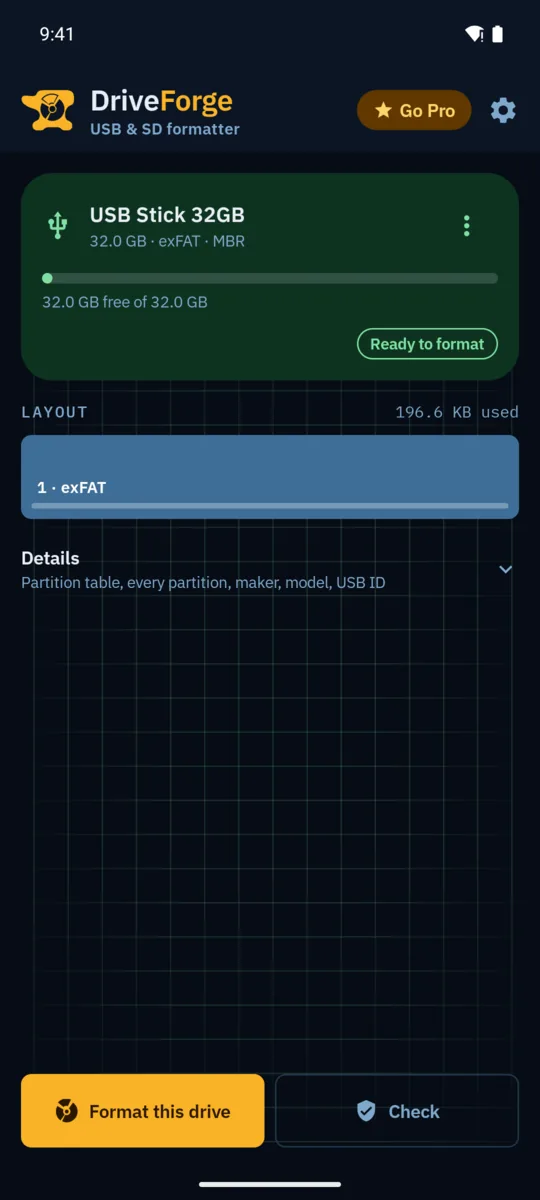
Plug the drive in
Connect a USB stick or a card reader through an OTG adapter. The drive shows up by itself, with its name, size and current layout.
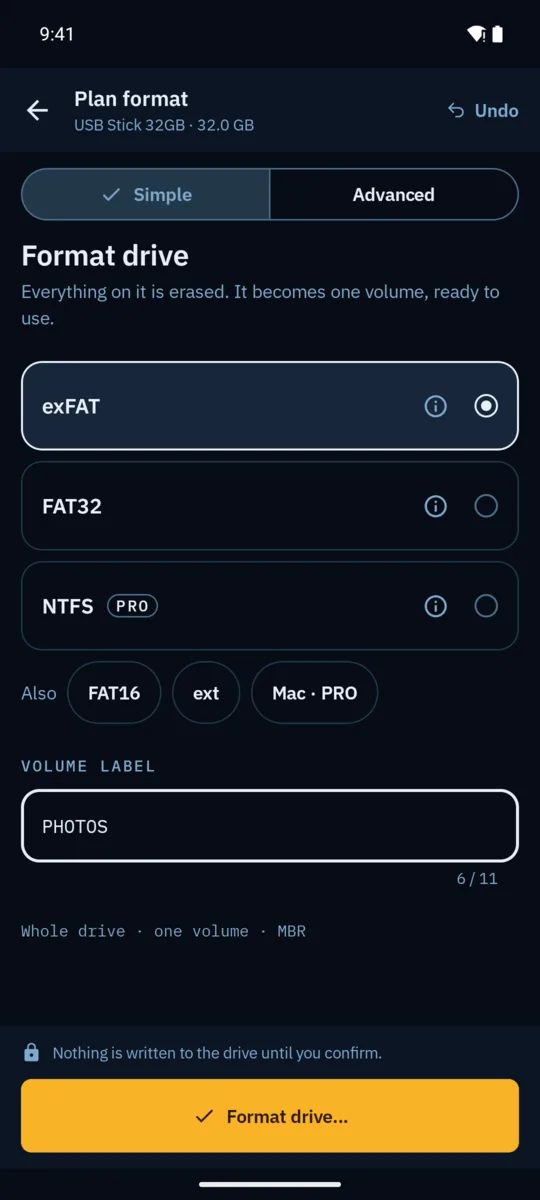
Pick a filesystem
exFAT, FAT32, FAT16 or ext4, with a line under each saying what it is good for. Nothing is written until you confirm.
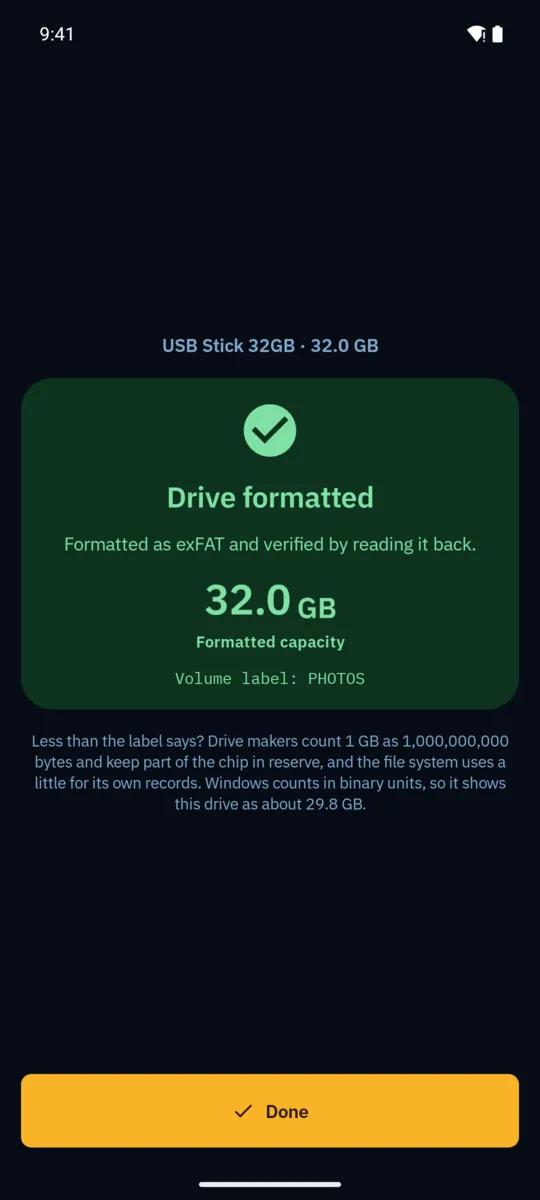
Formatted and verified
DriveForge reads the new filesystem back before it says done, and shows the capacity you really got.
02Features
Every common filesystem, and the right one for the job
A camera wants one thing, a car stereo another, a Linux box a third. DriveForge writes all of them, and tells you in one line what each is for.
| Filesystem | Good for | Free / Pro |
|---|---|---|
| exFAT | Phones, cameras, Windows and Mac. No 4 GB file limit. | Free |
| FAT32 | Works almost everywhere: cars, TVs, consoles, old PCs. Files up to 4 GB each. Free up to 32 GB, Pro above. | Free |
| FAT16 | Old gear that predates FAT32. Volumes up to about 2 GB. | Free |
| ext2 · ext3 · ext4 | Linux. Windows and Mac can't open it without extra software. | Free |
| NTFS | Windows' own filesystem. A Mac can read it but not write to it. | Pro |
| APFS · HFS+ | A drive for a Mac: one volume over the whole drive, on GPT. | Pro |
03Check a drive Free
Catch a fake-capacity drive before it eats your files
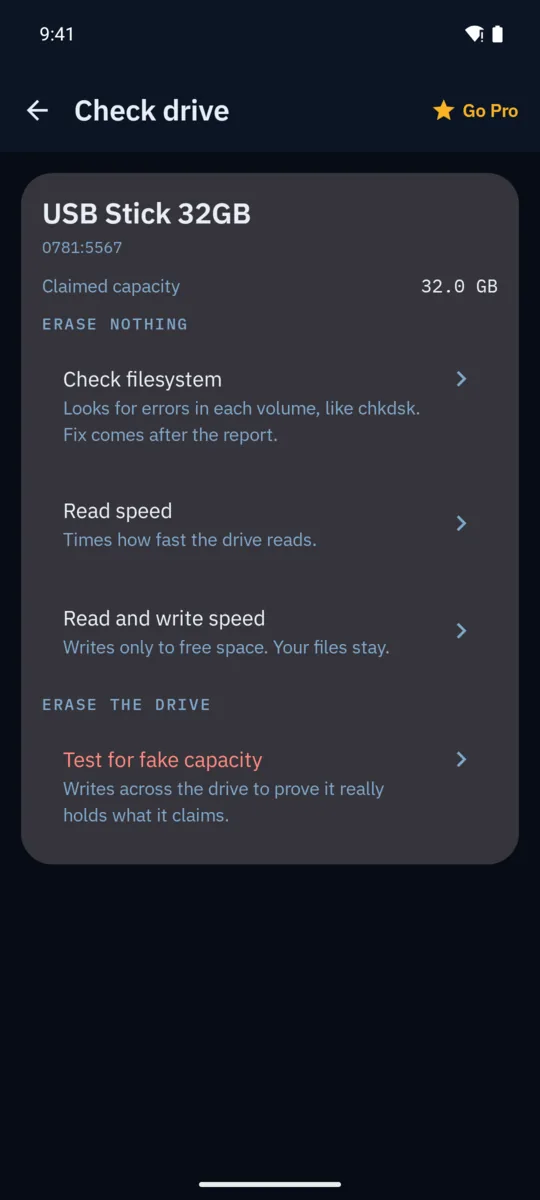
Counterfeit sticks and cards report a size they don't have, then silently lose whatever is written past the real one. The fake capacity test writes across the drive and reads it back to prove it holds what it claims. Quick or full, both free.
- Read speed, and read and write speed that writes only into free space, so your files stay
- Check a FAT or exFAT volume for errors, and clear the "not safely removed" mark
- With Pro, restore a fake drive to its true usable size so it stops losing data
04Safe by design
It names the drive before it erases anything
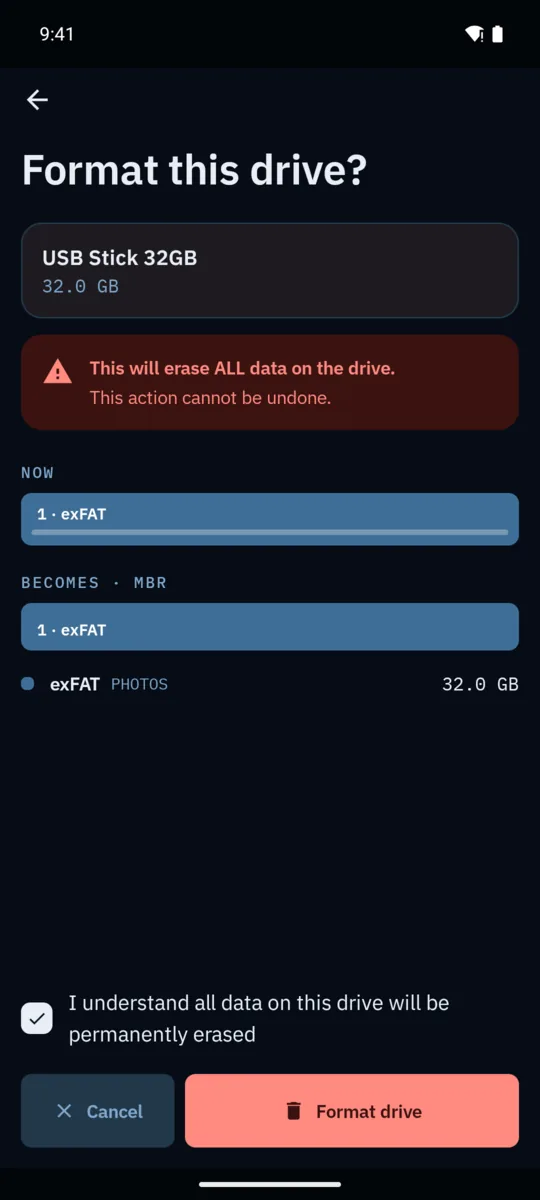
This will erase ALL data on the drive.
- Every format, erase and repair shows the drive's name and size, says plainly that the data will be erased, and waits for you to confirm
- Real progress, never a fake bar
- Every format is read back and verified before it says done
- Write-protected cards are shown as read-only, and encrypted drives are flagged before you erase them
05Partitions and Mac Pro
Split a drive, or make one for a Mac
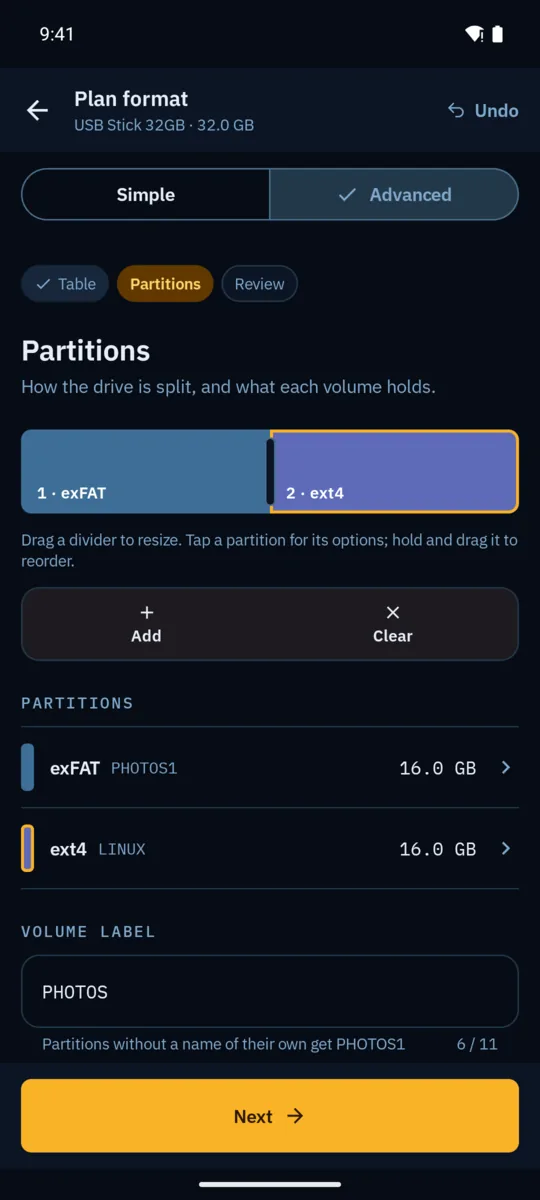
Pro lays out several partitions on one drive, GPT or MBR, with a filesystem of your choice for each: drag a divider to resize. Or format the whole drive as APFS or HFS+, ready to plug into a Mac.
- Cluster size, when a device is picky about it
- Convert MBR to GPT, keeping the files
- Edit a partition's type, name or bootable flag
06Toolkit
A drive toolkit in your pocket
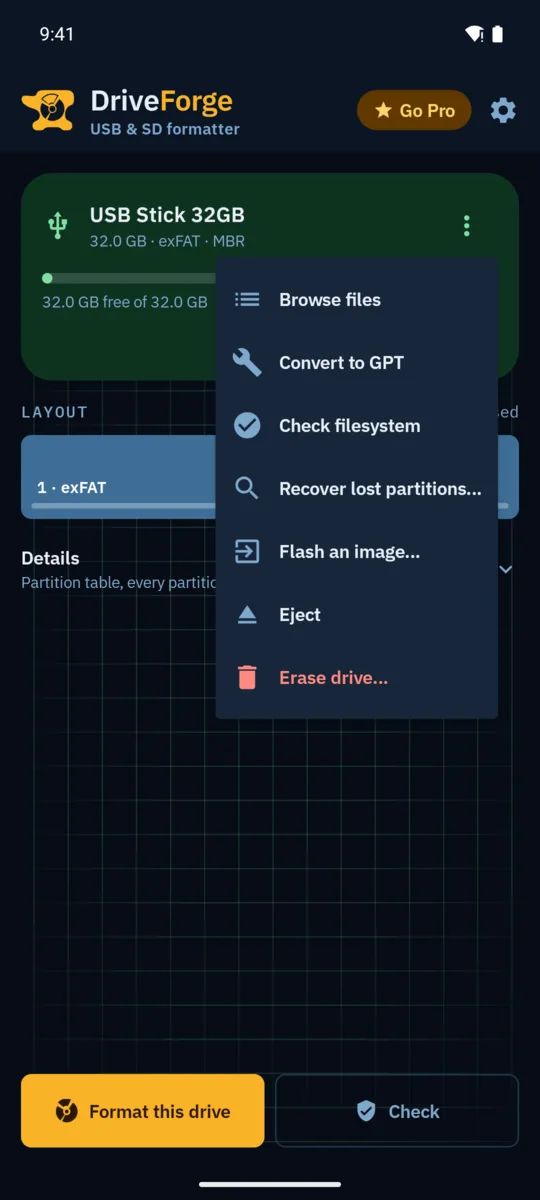
Beyond formatting, the drive's menu holds the tools you usually need a computer for.
- Scan for lost partitions before you decide anything. Pro writes back what the scan found, and no file is touched
- Erase a drive, quick or full (every sector zeroed and read back)
- Browse a stick's files, read-only, and eject it safely
- Deeper repair with Pro: restore a damaged boot sector from its backup, resync FAT copies, save lost clusters as files
07Free and Pro
Free, no catch. Pro is one purchase.
No subscription, no coins, no credits, no ads in either. Buy Pro once through Google Play and it stays unlocked.
| Feature | Free | Pro |
|---|---|---|
| Format | ||
| exFAT, FAT16, ext2, ext3, ext4 | Included | Included |
| FAT32 up to 32 GB | Included | Included |
| Volume label, or rename without formatting | Included | Included |
| One volume, or a "superfloppy" with no partition table | Included | Included |
| FAT32 larger than 32 GB | Not included | Included |
| NTFS | Not included | Included |
| APFS or HFS+ for a Mac | Not included | Included |
| Several partitions on one drive, GPT or MBR | Not included | Included |
| Cluster size | Not included | Included |
| Check | ||
| Test for fake capacity, quick or full | Included | Included |
| Read speed, and read and write speed | Included | Included |
| Check a FAT or exFAT volume for errors | Included | Included |
| Restore a fake drive to its true size | Not included | Included |
| Deeper filesystem repair | Not included | Included |
| Toolkit | ||
| Scan for lost partitions | Included | Included |
| Erase a drive, quick or full | Included | Included |
| Browse files (read-only) and eject safely | Included | Included |
| Write back lost partitions | Not included | Included |
| Convert MBR to GPT, keeping the files | Not included | Included |
| Edit a partition's type, name or bootable flag | Not included | Included |
08Private
Nothing leaves your phone
No operation needs the network. No account, no analytics, no tracking, nothing uploaded. Android asks you to allow USB access for each device, and that is the only permission DriveForge uses to reach it.
The details are in the privacy policy.
09What you need
Before you start
- A phone that supports USB OTG (most do)
- An OTG adapter or cable, and a USB stick, an SD or microSD card in a reader, or a USB drive
- Android 10 or newer
Drive not showing up? See the OTG checklist or Support.
10Guides
Answers for the drive in your hand
Step by step, written for people without a computer nearby.
- FormatHow to format a USB drive on AndroidTwo ways to do it from your phone: Android's own Settings, or an app that lets you choose the filesystem.Read the guide
- ChooseexFAT vs FAT32 vs NTFS: which format should a USB drive or SD card use?File size limits, and what TVs, cars, cameras, consoles, printers, PCs and phones can actually read.Read the guide
- CheckHow to check if a USB drive or SD card is fakeFake drives claim space they don't have. How to test the real capacity from a phone or a PC.Read the guide
- FormatHow to format a USB drive or SD card larger than 32 GB as FAT32The 32 GB cap belongs to the formatting tool, not to FAT32. Ways around it on Android, Windows, Mac and Linux.Read the guide
- FixUSB drive not detected on Android: how to check OTG support and fix itCheck whether your phone supports OTG, then work through the adapter, the setting, power and the drive's format.Read the guide
- FormatHow to format an SD card to exFAT or FAT32 on Android, without a PCPick exFAT or FAT32 for a memory card from your phone, with a USB card reader and no computer.Read the guide
11FAQ
Questions people ask
Can I format a USB drive on Android without a computer?
Yes. Plug the drive into your phone with an OTG adapter, open DriveForge, pick a filesystem and confirm. The app formats the drive and reads it back to verify it. No computer and no root are needed.
Is DriveForge free?
Formatting to exFAT, FAT32 (up to 32 GB), FAT16 and ext2, ext3 or ext4 is free, and so are the fake capacity test, the speed tests, the filesystem check and erasing a drive. Pro is a one-time purchase that adds NTFS, FAT32 above 32 GB, APFS and HFS+ for Mac, several partitions, cluster size and the repair tools. There are no ads and no subscription.
Which filesystem should I choose?
exFAT for a drive you share between phones, cameras, Windows and Mac: it has no 4 GB file limit. FAT32 for cars, TVs, consoles and older devices. NTFS for a Windows-only drive, ext4 for Linux, APFS or HFS+ for a Mac-only drive.
Can it format a 64 GB or larger drive as FAT32?
Yes, with Pro. FAT32 itself has no 32 GB limit. That cap comes from the formatting tool, and plenty of dashcams, car stereos and 3D printers still want FAT32 on a big card.
How do I know if a USB stick or SD card is fake?
Run Test for fake capacity on the Check screen. It writes across the drive and reads it back, so a drive that claims more than it holds is caught. The test erases the drive, so copy your files off first.
Can it format the SD card inside my phone's card slot?
No. DriveForge reaches drives over USB, so put the card in a USB card reader and plug the reader into the phone. A card that stays in the phone's own slot is formatted from Android's Settings.
My drive does not show up. What now?
Check that you are using an OTG adapter and not an ordinary cable, accept Android's USB permission prompt, and on some phones turn OTG on in Settings. A hard drive may need a powered hub. The OTG guide walks through each case.
Does it work offline, and what does it collect?
No operation needs the network. There is no account, no analytics and no tracking, and nothing about your drives leaves the phone.
Is there an iPhone version?
No. DriveForge is Android only: iOS gives apps no way to talk to a USB drive at the level formatting needs.
Can it recover deleted files?
No. DriveForge is a formatter and drive checker. It can find and restore lost partitions, which brings back a drive whose partition table was damaged, but it does not undelete individual files.