
- DriveForge
- Guides
- FAT32 on drives over 32 GB
Format
How to format a USB drive or SD card larger than 32 GB as FAT32
Your dashcam, car stereo or 3D printer wants FAT32, your card is 64 GB or more, and the format dialog only offers exFAT and NTFS. The drive can be FAT32. You just need a tool that will write it.
Short answer
FAT32 has no 32 GB limit. The cap comes from the Windows format dialog, which won't create FAT32 volumes above that size. To format a larger drive as FAT32, use a tool without the cap: DriveForge Pro on Android, Disk Utility ("MS-DOS (FAT)") on a Mac, or mkfs.fat -F 32 on Linux. The 4 GB limit on each file still applies.
Where the 32 GB limit comes from
FAT32 can describe volumes far larger than 32 GB: with standard 512-byte sectors, up to 2 TB. The familiar ceiling is a decision made in the 1990s for the Windows formatting tool, which has refused to create FAT32 volumes above 32 GB ever since. Windows reads and writes a 128 GB FAT32 drive without complaint. It just won't make one from the Format dialog.
Android's own formatter does something similar: it gives larger drives exFAT and offers no choice.
When you actually need large FAT32
exFAT is the better format for big drives, and most modern devices accept it. FAT32 on a large drive is for devices that never learned exFAT:
- Dashcams and security cameras that list "FAT32" in the manual even for 64 GB to 256 GB cards
- Car stereos that play music from USB
- 3D printers, whose firmware usually reads only FAT32
- Older game consoles and handhelds, and many retro-gaming and emulation devices
- TVs, set-top boxes and media players from before exFAT was common
- Motherboard BIOS update features
Remember the file limitWhatever the drive size, FAT32 can't hold a single file of 4 GB or more. For music, photos, dashcam clips and printer files that never matters. For long 4K videos it does.
On Android: DriveForge
DriveForge formats FAT32 at any size the drive has. FAT32 up to 32 GB is free. Above 32 GB it is part of Pro, a one-time purchase with no subscription.
- Connect the drivePlug the USB stick, or the SD card in a USB card reader, into the phone with an OTG adapter. Open DriveForge and grant USB access.
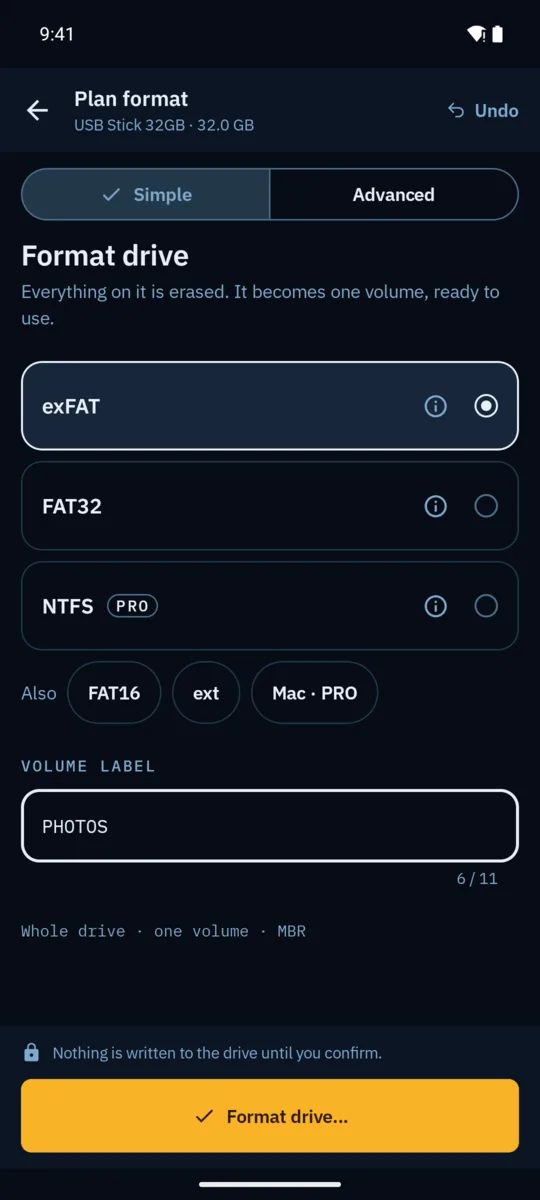
- Tap Format this driveThe Simple tab formats the whole drive as one volume.
- Choose FAT32On a drive over 32 GB the app tells you this needs Pro and offers the unlock.
- ConfirmCheck the drive's name and size on the confirmation screen, tick the box and tap Format drive.
- Wait for the verified resultThe app reads the new filesystem back before it reports Drive formatted.
If a device is particular about cluster size (the allocation unit), Pro also lets you set it by hand on the Advanced tab. Automatic is right in almost every case.
On Windows
- The Format dialog offers FAT32 only for volumes of 32 GB or less.
- The command line (
format X: /FS:FAT32) has had the same limit for decades. Recent Windows 11 builds raise it for the command-line tool, so on an up-to-date PC it may work, slowly. On Windows 10 it won't. - Third-party formatters exist that ignore the cap. Download them only from their authors' own sites.
On a Mac
Open Disk Utility, choose View, Show All Devices, select the drive itself (the top-level entry, not the volume under it) and click Erase. Choose the format MS-DOS (FAT) and the scheme Master Boot Record. For drives of this size Disk Utility writes FAT32, and it does not apply a 32 GB cap.
On Linux
Find the device with lsblk, then, for a partition such as /dev/sdX1:
sudo mkfs.fat -F 32 /dev/sdX1
Double-check the device name. The command erases whatever it is pointed at.
If the device still rejects the drive
- Use an MBR partition table, not GPT. Simple devices generally expect MBR. DriveForge's Simple tab uses MBR by default and shows the layout before you confirm.
- Try a smaller card. Some devices have a hard capacity ceiling, often 32 GB, 128 GB or 256 GB, whatever the format. The manual states it.
- Check that the card is genuine. A fake card fails in exactly this situation: it formats, then corrupts recordings. Run a fake capacity test.
Common questions
Can a 64 GB USB drive be formatted as FAT32?
Yes. FAT32 supports volumes far beyond 64 GB. You need a formatting tool without the 32 GB cap: DriveForge Pro on Android, Disk Utility on a Mac, or mkfs.fat on Linux.
Can a 128 GB or 256 GB SD card be FAT32?
Yes, and many dashcams and cameras require exactly that. Format it with a tool that allows large FAT32 volumes. Each file is still limited to 4 GB.
What is the maximum size of a FAT32 drive?
About 2 TB with the usual 512-byte sectors. The maximum size of a single file is 4 GB, whatever the drive size.
Is FAT32 slower than exFAT on a large drive?
For everyday copying the difference is small. exFAT handles very large files and very full drives more gracefully. Choose FAT32 for compatibility, not for speed.