
- DriveForge
- Guides
- Test for fake capacity
Check
How to check if a USB drive or SD card is fake
A counterfeit drive looks normal, shows the size on its label, and accepts every file you copy. The damage only appears later, when the files beyond its real capacity turn out to be corrupt or gone.
Short answer
The only reliable test is to write data across the whole drive and read it back. On Android, plug the drive in with an OTG adapter, open DriveForge, tap Check, then Test for fake capacity. On a PC, H2testw (Windows) and F3 (Linux and macOS) do the same job. The test erases the drive, so copy your files off first. A fake shows a real size far below the one it claims.
What a fake-capacity drive is
Every flash drive has a small controller chip that tells the computer how big the drive is. On a counterfeit, that chip has been programmed to lie: a cheap 8 or 16 GB memory chip announces itself as 256 GB, 1 TB or more.
Your phone or PC believes it. The drive formats at the fake size and shows the fake amount of free space. Everything works until you have written more than the real capacity. After that point the drive either throws the data away or wraps around and overwrites your earliest files. Nothing warns you. The files are listed, with the right names and sizes, and their contents are garbage.
Warning signs
None of these proves anything by itself, but each is a reason to test:
- The price was far below what that capacity costs from known brands, or the capacity is larger than any real product of that type.
- No brand, a misspelled brand, or packaging that looks off.
- Files copy fine but won't open later, especially videos that play for a while and then break.
- Copying slows to a crawl or fails once the drive is partly full.
- The drive works at first and "goes bad" after a few weeks of filling up.
Looking at the drive's properties does not help. The reported size is exactly what the controller was told to report.
Test it on Android with DriveForge
DriveForge's fake capacity test is free. It writes a pattern across the drive and reads it back, which is the only way to prove each part of the drive really stores data.
The test erases the driveThere is no reliable read-only way to spot a fake, so the test has to write. Copy anything you need off the drive before you start.
- Connect the drivePlug the USB stick, or the SD card in a USB card reader, into your phone with an OTG adapter. Open DriveForge and tap Grant access when Android asks.
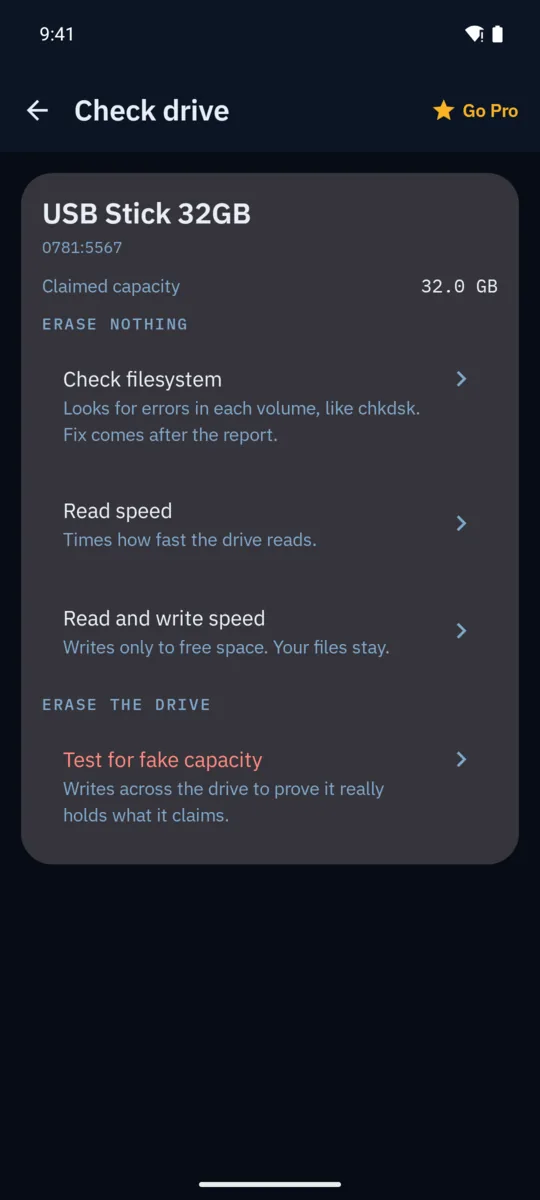
- Tap CheckThe Check screen lists the tests. Under "Erase the drive", tap Test for fake capacity.
- Choose the test depthThe Quick test is a fast sparse scan that catches the common fakes. The Full test writes and verifies every sector: it is definitive, and on a large drive it can take hours. The app shows an estimate before you start.
- ConfirmThe screen names the drive and says all data will be erased. Tick the box and tap Start test.
- Keep it connected until the verdictLeave the drive plugged in and the phone awake. You can cancel, but a cancelled test leaves the drive needing a reformat.
Reading the result
| Result | What it means |
|---|---|
| Drive is genuine | Every part tested stored and returned its own data. After a Full test this is proof. After a Quick test it means no fake was found in the sample, and only a Full test rules out a carefully disguised one. |
| Fake-capacity drive | The drive lies about its size. The screen shows the real usable size next to the claimed one. |
| Drive has bad sectors | The drive failed to read or write at some point. That looks like worn-out or faulty memory, not a size lie. Don't trust it with anything important. |
| Test inconclusive | The test couldn't reach a verdict, for example because the drive is write-protected or was unplugged. Reconnect it and try again. |
Test it on a computer
The method is the same everywhere: fill the drive with known data, then verify it.
- Windows: H2testw is the long-standing free tool. Format the drive, let it write until the drive is full, then verify.
- Linux and macOS: F3 ("Fight Flash Fraud") does the same from the command line with
f3writeandf3read.
Both are trustworthy. A full fill-and-verify pass on a large, slow drive takes hours on a PC as well.
If the drive is fake
- Return it. Ask the seller or the marketplace for a refund and report the listing. A screenshot of the test result is useful evidence.
- Assume the files on it are damaged. Anything written past the real capacity is lost. Files written early may still be intact, so copy off what opens.
- Don't keep using it as it is. At its claimed size it will lose data again.
- If you keep it, shrink it to the truth. DriveForge Pro can restore a fake drive to its real usable size, so that your devices stop writing past the real end. It then behaves as the small drive it actually is. See restoring a drive's real capacity.
Common questions
Can I test a drive for fake capacity without erasing it?
Not reliably. A fake controller reports whatever size it was programmed with, so reading the drive's properties proves nothing. The test has to write data and read it back, and that overwrites what was there.
How long does a fake capacity test take?
A quick test takes minutes. A full test writes and reads every sector, so it takes about as long as filling the drive twice: hours for a large or slow drive, on a phone or on a PC.
Can a fake USB drive be fixed?
Its real capacity can't be increased. It can be reformatted to its true size so it stops losing data, and then used as a small drive. The better fix is a refund.
Are fake SD cards as common as fake USB sticks?
Yes. Memory cards are a frequent target because they are small, cheap to print labels for, and often bought for cameras and phones without being checked. Test a new card in a USB card reader before you trust it with photos.