
- DriveForge
- Guides
- NTFS on Android
Format
NTFS drives and Android: how to read one, and how to format a drive as NTFS
NTFS is the Windows filesystem, and most Android phones don't speak it. That leads to two different questions: how to read an NTFS drive on a phone, and how to make one.
Short answer
Most Android phones can't mount NTFS, so an NTFS drive shows as "unsupported" and Android offers to format it. Don't accept if you need the files: that erases them. To open the files, use an app that reads NTFS, such as NtfsForge. To create an NTFS drive from a phone, use DriveForge Pro: Format this drive → NTFS. If the drive will be shared with phones, exFAT is the better choice.
Why Android says "unsupported"
Android mounts the filesystems it has drivers for: FAT32 everywhere, and exFAT on most current phones. NTFS belongs to Windows, and stock Android does not include a driver for it. A few manufacturers add one, so some phones do open NTFS drives, but most don't.
When you plug in an NTFS drive, one of two things happens:
- A notification says the USB drive is unsupported or has an issue, and offers to set it up
- Nothing appears in the file manager
The drive is fine, and the phone has detected it. It just can't read the format. If the drive doesn't register at all, that is a different problem: see USB drive not detected.
"Set up" means eraseAndroid's offer to set up or fix an unsupported drive formats it. Everything on your NTFS drive would be deleted. Dismiss the notification if you want to keep the files.
How to read an NTFS drive on Android
You need an app that brings its own NTFS support. No root is required, because Android lets apps talk to USB drives directly once you approve the USB permission prompt.
- NtfsForge is our sibling app for this. It opens NTFS, exFAT, FAT and ext4 drives in Android's own Files app, so you browse them like any other storage.
- Some file managers include NTFS readers, often as paid plugins.
- A computer is always an option: any Windows PC reads the drive, and a Mac reads it without writing.
DriveForge itself is a formatter. It identifies an NTFS drive, shows its size, label and layout, and can check and reformat it, but its file browser covers exFAT and FAT32 only.
Should the drive be NTFS at all?
NTFS is a good choice in a narrow set of cases:
- The drive only ever meets Windows PCs, for example a backup or archive disk
- A device asks for it by name, as some TVs and media players do for large video files
- You need Windows features such as file permissions or compression
For a drive that moves between a PC and a phone, a Mac, a camera or a TV, exFAT does everything most people want from NTFS, including files over 4 GB, and far more devices read it. There is a full comparison in exFAT vs FAT32 vs NTFS.
How to format a USB drive as NTFS on Android
Android's Settings can't create NTFS. DriveForge can: NTFS is part of Pro, its one-time unlock.
Formatting erases the driveCopy anything you need off the drive first.
- Connect the drivePlug it into the phone with an OTG adapter. Hard drives usually need a USB hub with its own power supply. Open DriveForge and tap Grant access.
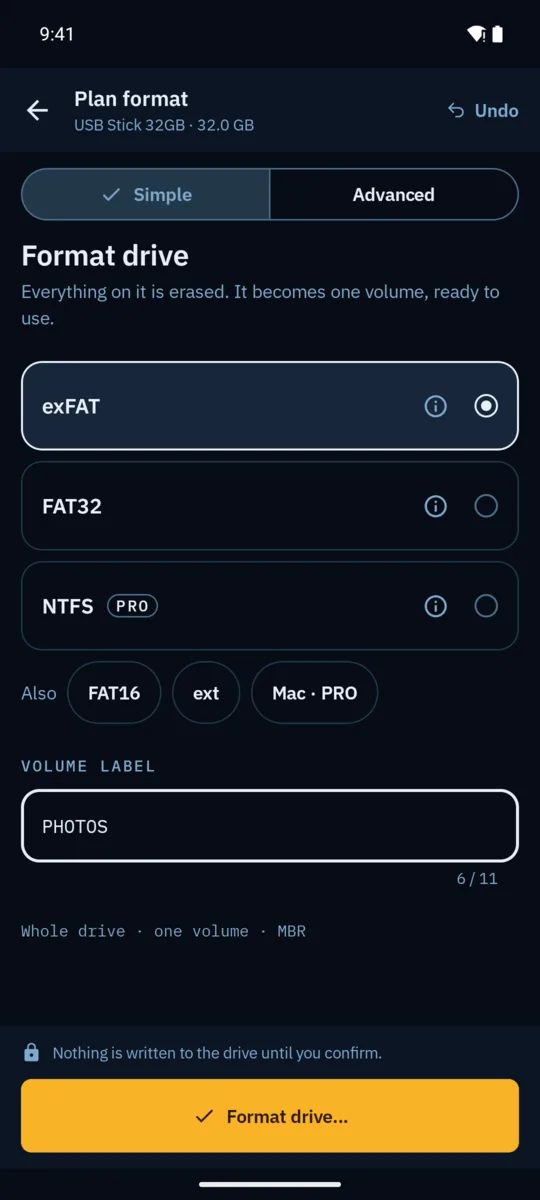
- Tap Format this driveThe Simple tab formats the whole drive as one NTFS volume.
- Choose NTFSIt is marked Pro. Add a volume label if you want the drive to have a name in Windows.
- ConfirmCheck the drive's name and size on the confirmation screen, tick the box and tap Format drive.
- Wait for the verified resultDriveForge reads the new filesystem back before it reports Drive formatted. Eject the drive from its menu, then plug it into the PC.
After formatting, expect your phone's file manager to stop showing the drive, for the reason at the top of this page. DriveForge still shows it, and Windows will open it normally.
Going the other way: NTFS to exFAT
If you have an NTFS drive and want it to work with your phone, the fix is to reformat it as exFAT, which is free in DriveForge. Formatting erases the drive, so copy the files to a PC first, format the drive, then copy them back. There is no reliable way to convert NTFS to exFAT in place.
Common questions
Can Android read NTFS USB drives?
Most Android phones can't read NTFS on their own. A few manufacturers add support. On other phones you need an app with its own NTFS reader, such as NtfsForge, or a computer.
Why does my phone want to format my external hard drive?
The drive is formatted as NTFS, or another format Android doesn't recognize, so Android offers to reformat it into one it does. Accepting erases the drive. Decline if the drive holds files you need.
Can I format a USB drive to NTFS on an Android phone?
Yes, with an app that writes NTFS. DriveForge Pro formats a drive as NTFS over a USB OTG connection and verifies the result. Android's built-in formatter does not offer NTFS.
Is NTFS or exFAT better for an external drive?
NTFS for a drive that only meets Windows PCs. exFAT for a drive shared with phones, Macs, cameras or TVs: it handles large files too, and far more devices read it.