
- DriveForge
- Guides
- Format a drive for Mac
Format
How to format a USB drive for a Mac from an Android phone
You have an Android phone, a USB drive, and a Mac somewhere else that needs the drive in Apple's format. You don't have to wait until you are at the Mac.
Short answer
Decide first whether the drive is for Macs only. If it also has to work with Windows, phones or TVs, format it as exFAT, which a Mac reads and writes natively. For a Mac-only drive, use APFS (modern Macs) or HFS+, also called Mac OS Extended (older Macs). On Android, DriveForge Pro writes both: plug the drive in with an OTG adapter, tap Format this drive, choose Mac, pick APFS or HFS+, name the volume and confirm.
APFS, HFS+ or exFAT: which one?
| Format | Use it when | Keep in mind |
|---|---|---|
| exFAT | The drive moves between a Mac and Windows PCs, Android phones, cameras or TVs | Not usable for Time Machine |
| APFS | The drive is only for Macs running macOS 10.13 (High Sierra) or newer. Best on SSDs and flash drives. | Windows, Android and older Macs can't read it without extra software |
| HFS+ (Mac OS Extended, Journaled) | The drive must also work with Macs older than 10.13, or it is a spinning hard drive | Windows and Android can't read it without extra software |
Most people who ask for a "Mac format" are best served by exFAT, which is free to format in DriveForge and works everywhere. Choose APFS or HFS+ when the drive really is Mac-only: a drive for app data, a macOS-only archive, or one that software insists must be in an Apple format.
About Time MachineTime Machine wants an Apple-formatted disk: APFS on macOS 11 (Big Sur) and later, HFS+ before that. When you select a drive as a backup disk, macOS may still offer to erase and prepare it itself. Let it.
Format a drive as APFS or HFS+ on Android
DriveForge writes both Apple formats as part of Pro, its one-time unlock. The result is what a Mac's own Disk Utility would make for an external drive: a GUID Partition Map (GPT) with one volume over the whole drive.
This erases the driveFormatting replaces everything on the drive. Copy your files off first.
- Connect the drivePlug it into the phone with an OTG adapter, open DriveForge and tap Grant access when Android asks.
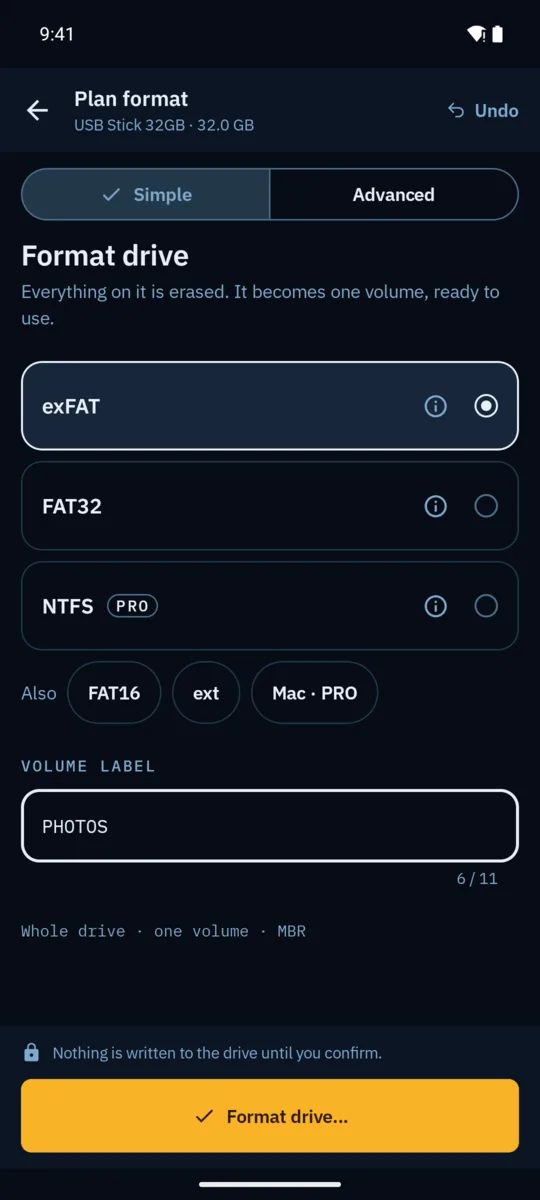
- Tap Format this driveStay on the Simple tab.
- Choose MacIt is in the "Also" row under the main filesystems, marked Pro. A second row lets you pick APFS or HFS+. APFS is preselected.
- Type a volume nameApple's formats need one. Use plain letters, digits and spaces: accents,
/and:are not accepted. - ConfirmThe screen names the drive, shows its size and shows that it becomes one GPT volume. Tick the box and tap Format drive.
- Wait for the verified resultDriveForge reads the new volume back before it reports Drive formatted. Eject the drive, then plug it into the Mac: it mounts under the name you gave it.
What you get:
- APFS: one container with one volume, case-insensitive, not encrypted
- HFS+: one journaled, case-insensitive volume (the format Disk Utility calls "Mac OS Extended (Journaled)")
- Partition table: GPT, which Macs expect on external drives
If you want an encrypted or case-sensitive volume, create this one first and convert or re-erase it on the Mac, where those options live.
After formatting: the phone can't open it, and that is expected
Android does not read APFS or HFS+, and neither does Windows. Once the drive is in an Apple format, your phone's file manager shows nothing for it. DriveForge still recognizes the drive and shows its filesystem and name, but it does not browse Apple volumes.
If you need to copy files onto the drive from the phone before it reaches the Mac, our sibling app ApfsForge opens HFS+ and APFS drives on Android. The other route is exFAT, which both sides read without any extra app.
The same thing on the Mac itself
If the Mac is at hand, use Disk Utility:
- Open Disk Utilityand choose View, Show All Devices.
- Select the drive itself,the top-level entry, not the volume under it.
- Click EraseChoose APFS or Mac OS Extended (Journaled), and the scheme GUID Partition Map.
Common questions
Can I format a USB drive for Mac without a Mac?
Yes. An Android phone with an OTG adapter can do it. DriveForge Pro formats a drive as APFS or HFS+ with a GPT partition table, the layout a Mac expects. exFAT is another option and needs no Apple format at all.
Should I use APFS or Mac OS Extended for an external drive?
APFS for Macs on macOS 10.13 or newer, especially for SSDs and flash drives. Mac OS Extended (HFS+) if the drive has to work with older Macs or is a spinning hard drive. exFAT if the drive is shared with Windows.
Can Windows or Android read an APFS drive?
Not on their own. Both need extra software to open APFS or HFS+. Use exFAT for a drive that has to work on a Mac and on other systems.
What is the best format for a USB drive used on both Mac and Windows?
exFAT. Both systems read and write it without extra software, and it has no 4 GB file size limit.