
- DriveForge
- Guides
- Wipe a drive before selling
Format
How to wipe a USB drive or SD card on Android before you give it away
Deleting files, or even formatting a drive, usually leaves the old data sitting on the flash where a recovery tool can find it. Before a drive leaves your hands, overwrite it.
Short answer
To wipe a drive so its files can't be recovered, overwrite every sector. On Android, plug the drive in with an OTG adapter, open DriveForge, open the drive's menu and choose Erase drive…, then Full: it writes zeros over the whole drive and reads it back to check. It is free. A quick format or quick erase only clears the index, and the old contents stay recoverable.
Why deleting and formatting are not enough
A filesystem is an index plus the data it points to. Deleting a file removes its index entry. A quick format writes a new, empty index. In both cases the data itself stays on the drive until something else happens to overwrite it, and free recovery tools exist precisely to find it.
That is useful when you delete something by accident. It is a problem when you sell a camera card, hand a USB stick to a colleague or return a drive to a shop.
| Method | What it removes | Recoverable afterwards? |
|---|---|---|
| Deleting files | Index entries | Usually yes |
| Quick format or quick erase | The index and the partition table | Usually yes |
| Full erase (overwrite) | Every sector the drive exposes | No, not with ordinary tools |
Wipe a drive on Android with DriveForge
Erasing is free in DriveForge, in both modes.
This is permanentA full erase can't be undone, by DriveForge or by anything else. Check that you have copies of whatever you want to keep, and check that the drive named on the screen is the one you mean.
- Connect the drivePlug the USB stick, or the card in a USB card reader, into the phone with an OTG adapter. Open DriveForge and tap Grant access.
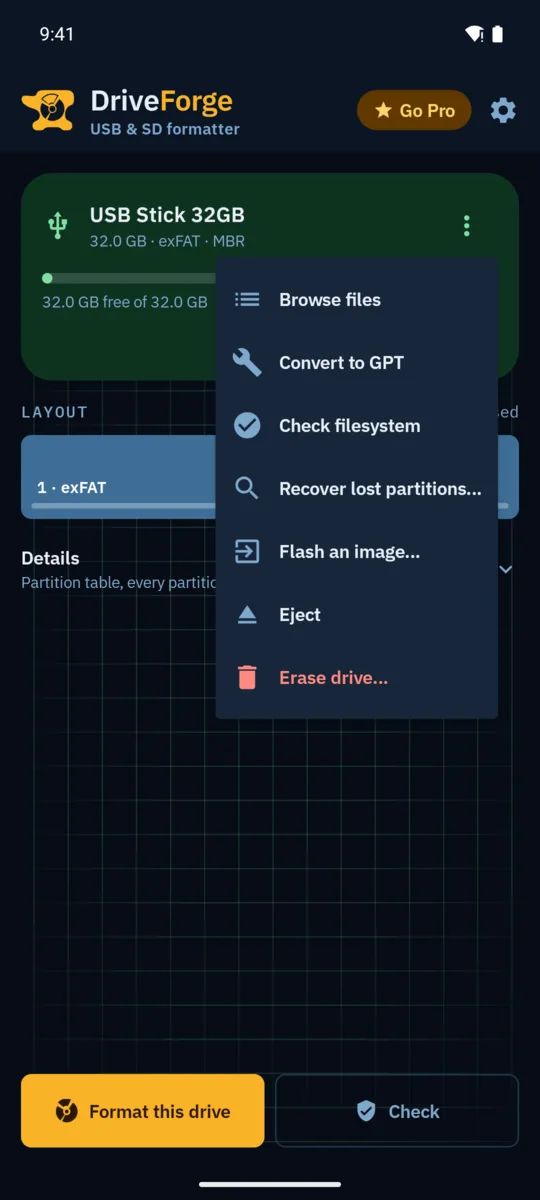
- Open the drive's menuTap the three dots on the drive's card and choose Erase drive…
- Choose FullQuick clears the partition table and filesystem signatures in seconds, and leaves the old contents on the flash. Full overwrites every sector with zeros and then checks the whole drive reads back as zeros.
- ConfirmThe screen names the drive and its size. Tick the box and tap Erase.
- Keep it connected until it finishesA full erase takes as long as filling the drive, then reading it: from several minutes for a small, fast stick to hours for a large or slow one. Keep the phone awake and the drive plugged in.
- Format it, if the next person should be able to use itAn erased drive is blank, with no filesystem. Tap Format this drive and choose exFAT or FAT32 so it works out of the box.
What a full erase can and can't promise
It is worth being precise here.
- What it does: every sector the drive presents to the phone is overwritten with zeros and verified. File recovery software, which reads those same sectors, finds nothing.
- What it can't reach: flash drives keep some spare memory for wear levelling that is not addressable from outside. Fragments of old data can remain in those spare blocks. Getting at them means removing the memory chip and reading it with laboratory equipment.
For personal photos, documents and ordinary business files, a verified full overwrite is the accepted way to clear a drive before passing it on. For data whose exposure would be serious, such as medical records, trade secrets or credentials, the dependable answers are encryption from the first day of use, or physically destroying the drive.
Other ways to wipe a drive
- Windows:
format X: /p:1overwrites the volume once. For the whole drive,diskpart, thenselect disk Nandclean all. Check the disk number carefully first. - macOS: Disk Utility, Erase, then Security Options where they are offered. Recent macOS versions hide them for flash storage.
- Linux:
sudo dd if=/dev/zero of=/dev/sdX bs=4M status=progress, with the device name double-checked.
Common questions
Does formatting a USB drive delete everything permanently?
No. A normal (quick) format replaces the file index and leaves the old data on the drive, where recovery software can usually find it. Only overwriting the drive removes the data.
How do I securely erase an SD card on Android?
Put the card in a USB card reader, connect it to the phone, and run a full erase in DriveForge: drive menu, Erase drive, Full. It overwrites every sector with zeros and verifies the result.
How long does it take to wipe a USB drive?
A full overwrite takes about as long as filling the drive with files and then reading it all back. Small, fast sticks take minutes. Large or slow drives can take hours.
Is one pass of zeros enough?
For flash drives and modern hard drives, one verified pass over every sector is enough to defeat file recovery software. Multiple passes add time and no practical protection.